


Talking Digital Table Clock With Alarm (Apple shaped)
Couldn't load pickup availability
 Get it between -


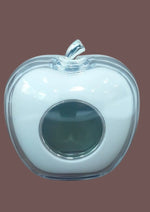
Product overview
|
Model Name/Number |
Talking Digital Table Clock with Alarm (Apple shaped) |
|
Brand |
Haptime |
|
Watch Type |
Talking |
|
Shape |
Apple |
|
Gender |
Neutral |
|
Category |
Home or Office |
|
Buttons |
4 buttons. The first button is the TAL which has to be slid or tapped. The other three buttons at the rear are D key, Mode key and S key |
|
Added Features |
Displays and talks out time and temperature Blue back LED light Snooze mode and integer hour talking function Languages- English italian, Spanish, Portuguese, french, German, korean Japanese, Russian Thai, Turkish, Arabic, Bahasa Indoesian, Hindi, Dutch, Malay, Vietnamese, Chinese |
|
Power Sources |
2 AAA batteries |
|
MRP |
INR 320 |
|
Weight |
300 Grams |
|
SKU |
DL/TK/01 |
Who this product may help
This product is intended for blind and low-vision people, families and organisations comparing practical aids for independent daily living. Individual needs and techniques vary, so review the confirmed details above and seek appropriate training or professional guidance where relevant.
What to confirm before ordering
- Dimensions, material and how the product is operated
- How information or controls are made accessible
- Items included, replacement parts and care instructions
- Compatibility, setup, warranty and support information where relevant
Related accessible products
Compare this item with independent daily living aids and accessible everyday essentials available from Saksham Life in India.
Institutional and bulk enquiries
Schools, colleges, libraries, NGOs, employers, rehabilitation centres and government organisations can request a quotation for quantity requirements. Include the product name, expected quantity, delivery location and any accessibility or documentation questions.